Bonjour à tous,
Je commence à prendre en main Diacamma et je suis très agréablement surpris par les fonctionnalités. Merci aux devellopeurs !
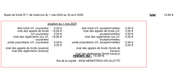
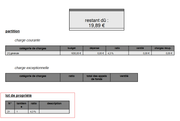
Cependant, je voulais faire un retour sur quelques problème concernant la mise en page des exports pdf pour les fiches suivantes :
Appel de fond :
Fiche de situation :
Propriétaire :
J’ai fouillé dans les patrons d’impressions afin de modifier le code. J’avoue ne pas y connaitre grand chose en code, mais les tentatives de modifications manuelles de format ou d’agrandisssement du logo ont fait choux blanc.
Merci d’avance pour vos réponses !
Réponse à moi meme :
J’ai réussi a changer la mise en page avec le code. J’avais l’impression que les modifications du code n’était pas pris en compte, mais il suffisait de saisir un copropriétaire dont je n’avais pas encore édité le pdf en question.
Bref, je vous met le résultat pour la fiche d’appel de fond :
Au besoin, je vous met le code modifié en question :
<model hmargin="10.0" vmargin="10.0" page_width="210.0" page_height="297.0">
	<header extent="25.0">
		<text height="20.0" width="120.0" top="5.0" left="70.0" padding="1.0" spacing="0.0" border_color="black" border_style="" border_width="0.2" text_align="center" line_height="20" font_family="sans-serif" font_weight="" font_size="20">
{[b]}#OUR_DETAIL.name{[/b]}
</text>
		<image height="30.0" width="30.0" top="0.0" left="10.0" padding="1.0" spacing="0.0" border_color="black" border_style="" border_width="0.2">
#OUR_DETAIL.image
</image>
	</header>
	<bottom extent="10.0">
		<text height="10.0" width="190.0" top="00.0" left="0.0" padding="1.0" spacing="0.0" border_color="black" border_style="" border_width="0.2" text_align="center" line_height="8" font_family="sans-serif" font_weight="" font_size="8">
{[italic]}
#OUR_DETAIL.address - #OUR_DETAIL.postal_code #OUR_DETAIL.city - #OUR_DETAIL.tel1 #OUR_DETAIL.tel2 #OUR_DETAIL.email{[br/]}#OUR_DETAIL.identify_number
{[/italic]}
</text>
	</bottom>
	<body>
		<text height="8.0" width="190.0" top="0.0" left="0.0" padding="1.0" spacing="0.0" border_color="black" border_style="" border_width="0.2" text_align="center" line_height="15" font_family="sans-serif" font_weight="" font_size="15">
{[b]}appel de fonds #num{[/b]}
</text>
		<text height="8.0" width="190.0" top="8.0" left="0.0" padding="1.0" spacing="0.0" border_color="black" border_style="" border_width="0.2" text_align="center" line_height="13" font_family="sans-serif" font_weight="" font_size="13">
#date
</text>
		<text height="20.0" width="100.0" top="25.0" left="80.0" padding="1.0" spacing="0.0" border_color="black" border_style="" border_width="0.2" text_align="center" line_height="11" font_family="sans-serif" font_weight="" font_size="11">
{[b]}#owner.third.contact.str{[/b]}{[br/]}#owner.third.contact.address{[br/]}#owner.third.contact.postal_code #owner.third.contact.city
</text>
		<table height="100.0" width="170.0" top="70.0" left="5.0" padding="1.0" spacing="0.0" border_color="black" border_style="" border_width="0.2">
			<columns width="20.0" display_align="center" border_color="black" border_style="solid" border_width="0.2" text_align="center" line_height="10" font_family="sans-serif" font_weight="" font_size="9">
    {[b]}catégorie de charges{[/b]}
    </columns>
			<columns width="84.0" display_align="center" border_color="black" border_style="solid" border_width="0.2" text_align="center" line_height="10" font_family="sans-serif" font_weight="" font_size="9">
    {[b]}désignation{[/b]}
    </columns>
			<columns width="17.0" display_align="center" border_color="black" border_style="solid" border_width="0.2" text_align="center" line_height="10" font_family="sans-serif" font_weight="" font_size="9">
    {[b]}total{[/b]}
    </columns>
			<columns width="25.0" display_align="center" border_color="black" border_style="solid" border_width="0.2" text_align="center" line_height="10" font_family="sans-serif" font_weight="" font_size="9">
    {[b]}somme des tantièmes{[/b]}
    </columns>
			<columns width="17.0" display_align="center" border_color="black" border_style="solid" border_width="0.2" text_align="center" line_height="10" font_family="sans-serif" font_weight="" font_size="9">
    {[b]}tantième{[/b]}
    </columns>
			<columns width="17.0" display_align="center" border_color="black" border_style="solid" border_width="0.2" text_align="center" line_height="10" font_family="sans-serif" font_weight="" font_size="9">
    {[b]}montant{[/b]}
    </columns>
			<rows data="calldetail_set">
				<cell display_align="center" border_color="black" border_style="solid" border_width="0.2" text_align="center" line_height="7" font_family="sans-serif" font_weight="" font_size="7">
#set
        </cell>
				<cell display_align="center" border_color="black" border_style="solid" border_width="0.2" text_align="center" line_height="7" font_family="sans-serif" font_weight="" font_size="7">
#designation
        </cell>
				<cell display_align="center" border_color="black" border_style="solid" border_width="0.2" text_align="center" line_height="7" font_family="sans-serif" font_weight="" font_size="7">
#total_amount
        </cell>
				<cell display_align="center" border_color="black" border_style="solid" border_width="0.2" text_align="center" line_height="7" font_family="sans-serif" font_weight="" font_size="7">
#set.total_part
        </cell>
				<cell display_align="center" border_color="black" border_style="solid" border_width="0.2" text_align="center" line_height="7" font_family="sans-serif" font_weight="" font_size="7">
#owner_part
        </cell>
				<cell display_align="center" border_color="black" border_style="solid" border_width="0.2" text_align="center" line_height="7" font_family="sans-serif" font_weight="" font_size="7">
#price_txt
        </cell>
			</rows>
		</table>
		<text height="15.0" width="20.0" top="120.0" left="125.0" padding="1.0" spacing="0.0" border_color="black" border_style="" border_width="0.2" text_align="right" line_height="9" font_family="sans-serif" font_weight="" font_size="9">
{[u]}{[b]}total:{[/b]}{[/u]}{[br/]}
</text>
		<text height="15.0" width="20.0" top="120.0" left="140.0" padding="1.0" spacing="0.0" border_color="black" border_style="" border_width="0.2" text_align="right" line_height="9" font_family="sans-serif" font_weight="" font_size="9">
{[u]}{[b]}#total{[/b]}{[/u]}{[br/]}
</text>
		<text height="20.0" width="100.0" top="120.0" left="0.0" padding="1.0" spacing="0.0" border_color="black" border_style="" border_width="0.2" text_align="left" line_height="9" font_family="sans-serif" font_weight="" font_size="9">
#comment
</text>
		<text height="5.0" width="190.0" top="130.0" left="00.0" padding="1.0" spacing="0.0" border_color="black" border_style="" border_width="0.2" text_align="center" line_height="9" font_family="sans-serif" font_weight="" font_size="9">
{[u]}{[i]}situation au #owner.date_current{[/i]}{[/u]}
</text>
		<text height="15.0" width="60.0" top="135.0" left="00.0" padding="1.0" spacing="0.0" border_color="black" border_style="" border_width="0.2" text_align="right" line_height="9" font_family="sans-serif" font_weight="" font_size="9">
{[i]}état initial (ch. courantes):{[/i]}{[br/]}
{[i]}total des appels de fonds (ch.courantes):{[/i]}{[br/]}
{[i]}total des règlements (sur ch. courantes):{[/i]}{[br/]}
{[i]}solde propriétaire (ch. courantes):{[/i]}{[br/]}
{[br/]}
{[i]}total des appels de fonds (avance):{[/i]}{[br/]}
{[i]}total des règlements (avance):{[/i]}{[br/]}
</text>
		<text height="15.0" width="15.0" top="135.0" left="60.0" padding="1.0" spacing="0.0" border_color="black" border_style="" border_width="0.2" text_align="right" line_height="9" font_family="sans-serif" font_weight="" font_size="9">
#owner.total_current_initial{[br/]}
#owner.total_current_call{[br/]}
#owner.total_current_payoff{[br/]}
#owner.total_current_owner{[br/]}
{[br/]}
#owner.total_cash_advance_call{[br/]}
#owner.total_cash_advance_payoff{[br/]}
</text>
		<text height="15.0" width="70.0" top="135.0" left="90.0" padding="1.0" spacing="0.0" border_color="black" border_style="" border_width="0.2" text_align="right" line_height="9" font_family="sans-serif" font_weight="" font_size="9">
{[i]}état initial (ch. exceptionnelles):{[/i]}{[br/]}
{[i]}total des appels de fonds (ch. exceptionnelles):{[/i]}{[br/]}
{[i]}total des règlements (sur ch. exceptionnelles):{[/i]}{[br/]}
{[i]}solde propriétaire (ch. exceptionnelles):{[/i]}{[br/]}
{[br/]}
{[i]}total des appels de fonds (fonds de travaux):{[/i]}{[br/]}
{[i]}total des règlements (fonds travaux):{[/i]}{[br/]}
</text>
		<text height="15.0" width="15.0" top="135.0" left="160.0" padding="1.0" spacing="0.0" border_color="black" border_style="" border_width="0.2" text_align="right" line_height="9" font_family="sans-serif" font_weight="" font_size="9">
#owner.total_exceptional_initial{[br/]}
#owner.total_exceptional_call{[br/]}
#owner.total_exceptional_payoff{[br/]}
#owner.total_exceptional_owner{[br/]}
{[br/]}
#owner.total_fund_works_call{[br/]}
#owner.total_fund_works_payoff{[br/]}
</text>
		<text height="15.0" width="190.0" top="170.0" left="0.0" padding="1.0" spacing="0.0" border_color="black" border_style="" border_width="0.2
" text_align="center" line_height="11" font_family="sans-serif" font_weight="" font_size="11">
{[b]}{[u]}restant dû : #owner.sumtopay{[/u]}{[/b]}
</text>
	</body>
</model>
Thyami
Octobre 3, 2024, 4:08
4
Bonjour,
J’ai légèrement modifié vos valeurs de façon à obtenir dans la situation comptable une seule ligne lorsque le solde est débiteur et supérieur à 1000 €.
<model hmargin="10.0" vmargin="10.0" page_width="210.0" page_height="297.0">
	<header extent="25.0">
		<text height="20.0" width="120.0" top="5.0" left="70.0" padding="1.0" spacing="0.0" border_color="black" border_style="" border_width="0.2" text_align="center" line_height="20" font_family="sans-serif" font_weight="" font_size="20">
{[b]}#OUR_DETAIL.name{[/b]}
</text>
		<image height="30.0" width="30.0" top="0.0" left="10.0" padding="1.0" spacing="0.0" border_color="black" border_style="" border_width="0.2">
#OUR_DETAIL.image
</image>
	</header>
	<bottom extent="10.0">
		<text height="10.0" width="190.0" top="00.0" left="0.0" padding="1.0" spacing="0.0" border_color="black" border_style="" border_width="0.2" text_align="center" line_height="8" font_family="sans-serif" font_weight="" font_size="8">
{[italic]}
#OUR_DETAIL.address - #OUR_DETAIL.postal_code #OUR_DETAIL.city - #OUR_DETAIL.tel1 #OUR_DETAIL.tel2 #OUR_DETAIL.email{[br/]}#OUR_DETAIL.identify_number
{[/italic]}
</text>
	</bottom>
	<body>
		<text height="8.0" width="190.0" top="0.0" left="0.0" padding="1.0" spacing="0.0" border_color="black" border_style="" border_width="0.2" text_align="center" line_height="15" font_family="sans-serif" font_weight="" font_size="15">
{[b]}appel de fonds #num{[/b]}
</text>
		<text height="8.0" width="190.0" top="8.0" left="0.0" padding="1.0" spacing="0.0" border_color="black" border_style="" border_width="0.2" text_align="center" line_height="13" font_family="sans-serif" font_weight="" font_size="13">
#date
</text>
		<text height="20.0" width="100.0" top="25.0" left="80.0" padding="1.0" spacing="0.0" border_color="black" border_style="" border_width="0.2" text_align="center" line_height="11" font_family="sans-serif" font_weight="" font_size="11">
{[b]}#owner.third.contact.str{[/b]}{[br/]}#owner.third.contact.address{[br/]}#owner.third.contact.postal_code #owner.third.contact.city
</text>
		<table height="100.0" width="170.0" top="70.0" left="5.0" padding="1.0" spacing="0.0" border_color="black" border_style="" border_width="0.2">
			<columns width="20.0" display_align="center" border_color="black" border_style="solid" border_width="0.2" text_align="center" line_height="10" font_family="sans-serif" font_weight="" font_size="9">
    {[b]}catégorie de charges{[/b]}
    </columns>
			<columns width="84.0" display_align="center" border_color="black" border_style="solid" border_width="0.2" text_align="center" line_height="10" font_family="sans-serif" font_weight="" font_size="9">
    {[b]}désignation{[/b]}
    </columns>
			<columns width="17.0" display_align="center" border_color="black" border_style="solid" border_width="0.2" text_align="center" line_height="10" font_family="sans-serif" font_weight="" font_size="9">
    {[b]}total{[/b]}
    </columns>
			<columns width="25.0" display_align="center" border_color="black" border_style="solid" border_width="0.2" text_align="center" line_height="10" font_family="sans-serif" font_weight="" font_size="9">
    {[b]}somme des tantièmes{[/b]}
    </columns>
			<columns width="17.0" display_align="center" border_color="black" border_style="solid" border_width="0.2" text_align="center" line_height="10" font_family="sans-serif" font_weight="" font_size="9">
    {[b]}tantième{[/b]}
    </columns>
			<columns width="17.0" display_align="center" border_color="black" border_style="solid" border_width="0.2" text_align="center" line_height="10" font_family="sans-serif" font_weight="" font_size="9">
    {[b]}montant{[/b]}
    </columns>
			<rows data="calldetail_set">
				<cell display_align="center" border_color="black" border_style="solid" border_width="0.2" text_align="center" line_height="7" font_family="sans-serif" font_weight="" font_size="7">
#set
        </cell>
				<cell display_align="center" border_color="black" border_style="solid" border_width="0.2" text_align="center" line_height="7" font_family="sans-serif" font_weight="" font_size="7">
#designation
        </cell>
				<cell display_align="center" border_color="black" border_style="solid" border_width="0.2" text_align="center" line_height="7" font_family="sans-serif" font_weight="" font_size="7">
#total_amount
        </cell>
				<cell display_align="center" border_color="black" border_style="solid" border_width="0.2" text_align="center" line_height="7" font_family="sans-serif" font_weight="" font_size="7">
#set.total_part
        </cell>
				<cell display_align="center" border_color="black" border_style="solid" border_width="0.2" text_align="center" line_height="7" font_family="sans-serif" font_weight="" font_size="7">
#owner_part
        </cell>
				<cell display_align="center" border_color="black" border_style="solid" border_width="0.2" text_align="center" line_height="7" font_family="sans-serif" font_weight="" font_size="7">
#price_txt
        </cell>
			</rows>
		</table>
		<text height="15.0" width="50.0" top="120.0" left="95.0" padding="1.0" spacing="0.0" border_color="black" border_style="" border_width="0.2" text_align="right" line_height="9" font_family="sans-serif" font_weight="" font_size="9">
{[u]}total de l'appel :{[/u]}{[br/]}
</text>
		<text height="15.0" width="20.0" top="120.0" left="140.0" padding="1.0" spacing="0.0" border_color="black" border_style="" border_width="0.2" text_align="right" line_height="9" font_family="sans-serif" font_weight="" font_size="9">
{[u]}{[b]}#total{[/b]}{[/u]}{[br/]}
</text>
		<text height="20.0" width="100.0" top="120.0" left="0.0" padding="1.0" spacing="0.0" border_color="black" border_style="" border_width="0.2" text_align="left" line_height="9" font_family="sans-serif" font_weight="" font_size="9">
#comment
</text>
		<text height="5.0" width="190.0" top="130.0" left="00.0" padding="1.0" spacing="0.0" border_color="black" border_style="" border_width="0.2" text_align="center" line_height="9" font_family="sans-serif" font_weight="" font_size="9">
{[u]}{[i]}situation au #owner.date_current{[/i]}{[/u]}
</text>
		<text height="15.0" width="60.0" top="135.0" left="00.0" padding="1.0" spacing="0.0" border_color="black" border_style="" border_width="0.2" text_align="right" line_height="9" font_family="sans-serif" font_weight="" font_size="9">
{[i]}état initial (ch. courantes):{[/i]}{[br/]}
{[i]}total des appels de fonds (ch.courantes):{[/i]}{[br/]}
{[i]}total des règlements (sur ch. courantes):{[/i]}{[br/]}
{[i]}solde propriétaire (ch. courantes):{[/i]}{[br/]}
{[br/]}
{[i]}total des appels de fonds (avance):{[/i]}{[br/]}
{[i]}total des règlements (avance):{[/i]}{[br/]}
</text>
		<text height="15.0" width="20.0" top="135.0" left="60.0" padding="1.0" spacing="0.0" border_color="black" border_style="" border_width="0.2" text_align="right" line_height="9" font_family="sans-serif" font_weight="" font_size="9">
#owner.total_current_initial{[br/]}
#owner.total_current_call{[br/]}
#owner.total_current_payoff{[br/]}
#owner.total_current_owner{[br/]}
{[br/]}
#owner.total_cash_advance_call{[br/]}
#owner.total_cash_advance_payoff{[br/]}
</text>
		<text height="15.0" width="70.0" top="135.0" left="90.0" padding="1.0" spacing="0.0" border_color="black" border_style="" border_width="0.2" text_align="right" line_height="9" font_family="sans-serif" font_weight="" font_size="9">
{[i]}état initial (ch. exceptionnelles):{[/i]}{[br/]}
{[i]}total des appels de fonds (ch. exceptionnelles):{[/i]}{[br/]}
{[i]}total des règlements (sur ch. exceptionnelles):{[/i]}{[br/]}
{[i]}solde propriétaire (ch. exceptionnelles):{[/i]}{[br/]}
{[br/]}
{[i]}total des appels de fonds (fonds de travaux):{[/i]}{[br/]}
{[i]}total des règlements (fonds travaux):{[/i]}{[br/]}
</text>
		<text height="15.0" width="20.0" top="135.0" left="160.0" padding="1.0" spacing="0.0" border_color="black" border_style="" border_width="0.2" text_align="right" line_height="9" font_family="sans-serif" font_weight="" font_size="9">
#owner.total_exceptional_initial{[br/]}
#owner.total_exceptional_call{[br/]}
#owner.total_exceptional_payoff{[br/]}
#owner.total_exceptional_owner{[br/]}
{[br/]}
#owner.total_fund_works_call{[br/]}
#owner.total_fund_works_payoff{[br/]}
</text>
		<text height="15.0" width="190.0" top="170.0" left="0.0" padding="1.0" spacing="0.0" border_color="black" border_style="" border_width="0.2
" text_align="center" line_height="11" font_family="sans-serif" font_weight="" font_size="12">
{[b]}{[u]}MONTANT A PAYER : #owner.sumtopay{[/u]}{[/b]}
</text>
	</body>
</model>
En pièce jointe, le résultat avant / après.
PS : Il est possible de voir le résultat en imprimant un appel de fond déjà réalisé et en choisissant dans la boite de dialogue “générer un duplicata”.
Thyami
Janvier 22, 2025, 8:46
5
Bonjour,
Dans la perspective de continuer à rendre les éditions conformes à mes attentes, je cherche à savoir si les patrons concernant les budgets sont égalment modifiables.
Merci d’avance
lag
Janvier 23, 2025, 9:08
6
Bonjour,
Non, les impressions relatives à “Bilan”, “Compte de résultat”, “Grand livre”, “Balance” et ceux équivalent en comptabilité analytique ne sont pas paramétrable.
Notez néanmoins, qu’il est possible pour le “Compte de résultat” d’améliorer la présentation avec l’utilisation des “rubriques” de charge et de produit (à précisez, dans le plan comptable, pour chaque code comptable).
Thyami
Janvier 23, 2025, 9:13
7
Merci de votre réponse.